XCode Odds & Ends: Automated Builds

April 5th, 2007 — 1:38pm

It is a bit serendipitous that Gus Mueller’s discussion of Automated Builds on the Late Night Cocoa podcast should happen soon after I finally got my own act together and automated most of my build process. So, taking advantage of the momentum I thought I’d ramble on for a bit on the topic.

My process does not do as much as Gus’ (I don’t automatically upload) and it’s all triggered from within XCode when I do a Release build (Gus uses a script) but the important part is in the end I have a procedure that does most of the tedious parts for me. The problem with automating the process with XCode is that there are certain types of phases or resources that it doesn’t not handle natively so you have to script them yourself or it’s not obvious how to do it the right way. I thought I’d go over a couple of the oddball cases. Not all will be applicable but hopefully you can find something useful.

Code Stripping

This is something I neglected to deal with for the longest time. The notion is to strip your code but keep an unstripped version around so that you can use it with atos when you get a stack trace. I never got around to figuring out the right combination of settings on my own but this post gives you everything you need. Just stick this in a shell script phase after the product is built and use the XCode settings outlined in the comments. A big thanks to Andy O’Meara and Rob Barris for figuring it all out and sharing.

Building DMGs

This is one a bit trickier. Everyone seems to have their own methods and requirements for this so I’ll just point out some specific things here. First off, it’s all done with hdituil. If you don’t feel like learning hdiutil there are higher-level commandline programs and scripts you can use such as buildDMG or DropDMG (the latter is a GUI app which also comes with a commandline program).

In my case, I don’t construct the DMG from scratch. I created a template disk image with placeholders for my files. There are ways to deal with icon positioning programmatically but really, it’s just easier to do it by hand, save the image and use it over and over again. During a build, I mount the disk image, replace the files and then unmount. The disk image is then converted to a compressed format. For the mounting part, use the “-private” flag. It prevents Finder from seeing it so you don’t have to deal with the DMG window popping up while it’s being packaged. Unfortunately, my current script has some quirks specific to me so I’m not posting it but feel free to drop me a line if you have questions.

Also, credit goes to Jonathan Wight for providing the ideas and script that formed the basis of the DMG build procedure outlined above.

Useful Commandline Tools

If you are building an app then this is not an issue but for preference panes, it’s common to have a customized Finder icon for the .prefPane file itself (note that the icon specified in your bundle is for within the System Preferences app). For this, I downloaded the osxutils package. It contains a commandline program called “seticon” which, as the name indicates, sets an icon on a file. There are other little commandline programs to do things like set the Finder comment or the color label.

[Update: Tom Harrington was kind enough to point out my boneheadedness. Setting bundle icons in Info.plist for pref panes works fine so using the seticon program above is totally unnecessary. There was a misconfiguration in my project that lead to my faulty assumption that you had to set it separately.]

There’s also SetFile (comes with the dev tools) which is useful for setting HFS+ attributes. For instance, if you want to script setting the background image file in your DMG to be invisible, a SetFile -a V yourfile will do the trick.

So, basically most of the things you can and want to do to files in the Finder can be done on the commandline (therefore making them available for scripts).

XCode and External Targets/Dependencies

This is something that I always forget how to do. If your project has a dependency on some other project, such as a framework, you can drag the xcodeproj file into your project. But to create an actual dependency between your target and the external target, you can’t drag the thing underneath your target nor can you do a “Get Info” on the external target and check off the targets it’s a part of. Instead, select your target and do a “Get Info” on it. Under the “General” tab, hit the plus (+) button at the bottom to add the external product as a dependency. Also, you need to have both projects build to the same directory (“Get Info”->”General” tab). Now, building your target will build the dependent target as necessary. The important thing is that you do not depend on specific files. If you find yourself typing in paths that refer to another project’s build directory, you are probably doing it incorrectly.

XCode and Applescripts

I have some Applescripts in my project. Before, I saved them as .scpt files which are already compiled. Because they were already compiled, XCode’s “Compile AppleScripts” phase didn’t apply. Since I wanted to convert them to be “Run only”, I added a shell script build phase to use osacompile but this was a little clunky. I had to run it once to get XCode to generate the new .scpt files and then I added those to the XCode project so that they could be copied into the bundle during a build.

Instead of using .scpt, I now use plain, uncompiled .applescript files. XCode knows how to deal with these via the “Compile AppleScripts” phase. To make the compiled script “Run only”, add “-x” to the OTHER_OSAFLAGS setting in your build settings. Note that you may have to add “OTHER_OSAFLAGS” if it doesn’t exist.

• • •

So, that’s it for my random XCode tips. My build procedure is not perfect. I need to better automate versioning but for now it’s relatively pain free. If you have any tidbits, post them here.


2 comments » | Xcode

Odd Web Traffic

March 29th, 2007 — 11:51am

Looking at my web stats I noticed a lot of downloads. While normally this would be a good thing there was something suspicious about the hits.

  • The rest of the site traffic was normal.
  • Many were multiple requests from the same addresses.
  • Many of the sessions went straight to the download without looking at any other pages.
  • The user-agent was “CFNetwork”
  • They were HEAD requests (so they weren’t really downloads).

Through some digging and poking around, I realized it was AppFresh. For those who don’t know, AppFresh is a program that basically is Apple’s Software Update for non-Apple software. It uses various mechanisms to figure out how to check on the latest version of your app. I’m glad someone decided to take this on and I’m interested to see how it progresses. Nonetheless, it’s prerelease and has a few wrinkles that need to be ironed out (such as not setting the user-agent so us devs could figure out what was happening). The developers seem responsive though so feel free to drop them a line.

The point of all this is that there are other devs that are just as confused or alarmed as I was about the traffic. Hopefully this will save some time and effort in trying to investigate this. This also fulfills my public service requirement for my PWI (Programming While Intoxicated) conviction last year.

On a side note, the topic of HEAD requests opens up a whole slew of lewd titles that I could have used for this post. Feel free to laud or chastise me for my restraint or sheepishness.

[Update: Just got a note from the AppFresh guys indicating they’ve released Preview 3 which now sets the user-agent, among other things. The quick turnaround is quite commendable. ]

Comment » | Uncategorized

Hazel Family Pack now available

March 23rd, 2007 — 4:49pm

I know I’m late to the party with this but I’ve finally made available a Family Pack. Install Hazel on up to 5 computers in the same household for $29. Direct link to the store.

The ice is thawing. Flowers are beginning to bloom. I can think of no better time grab a pack and get a headstart on your spring cleaning.

2 comments » | Hazel

A Different Kind of Bug Database

March 22nd, 2007 — 11:03am

When it comes to debugging, programmers become a bit like doctors. You look at the symptoms. You run some tests. You poke. You prod. You get your code to turn and cough. With any luck, you come up with the correct diagnosis and address the problem.

Of course, we aren’t always right or we forget how we fixed that one bug last year. As a result, we spend much more time on a bug than is necessary as we have to “re-learn” it.

Now, I’ve heard that doctors have access to databases where they can look up cases and cross-reference symptoms and diseases. Why not something similar for programmers? It’s a bug database, but not the type of database you normally use. It would be a meta-bug database of sorts. It would list bug “symptoms” from which you can find explanations of the problem, lines of investigation and possible solutions. It’s like a bug database after you’ve done a post-mortem on a problem.

Here’s a simple example:

Symptoms:
“selector not recognized”

Explanation:
An object is being sent a message that it does not implement.

Further Steps/Solutions:

  • You may have misassigned it. Make sure the object being called is of the class you think it is.
  • You may have freed the object and its memory location subsequently has been populated with something else. Check your memory management.
  • You may be accessing an uninitialized variable. Compile with -Wuninitialized.

Now, the last one I listed there was not something I would think of immediately, which is the point of this. In addition, I’m sure there are also other cases I didn’t list.

The database would draw upon the collective experience of programmers and would help to guide and expose new avenues of investigation. So, the idea is to start a colloborative, wiki-like bug reference database. I don’t know the how, who and where but I thought I’d put the idea out there to see if it gets any traction. Maybe it already exists in which case let us know about it.

9 comments » | Debugging, Programming

Mystery Bug: Heisenberg’s Uncertainty Principle

March 7th, 2007 — 6:59pm

I’ve spent the past couple hours going crazy over a bug. It’s the type of bug where it breaks except for when you look at it, in which case, it works all the time. Don’t believe me? Compile the following program:

#import <Foundation/Foundation.h>

int main(int argc, const char *argv[])
{
    NSAutoreleasePool     *pool;
    NSString              *path;
    NSDictionary          *dict;
  
    pool = [[NSAutoreleasePool alloc] init];
    path = [NSString stringWithUTF8String:argv[1]];
  
    dict = [[NSFileManager defaultManager] fileAttributesAtPath:path
                                         traverseLink:NO];

    // The busy flag will be NULL if you comment out the next line.
    //NSLog(@"DICT: %@", dict);

    NSLog(@"Creation: %@", [dict objectForKey:NSFileCreationDate]);
    NSLog(@"Busy: %@", [dict objectForKey:NSFileBusy]);
}


By the way, I know I’m not releasing the pool.

Now, take a file and set its busy flag. You can do this as follows:

/Developer/Tools/SetFile -a Z some file

Then run my little program with some file as an argument. Notice how the busy flag is null?

Well, let’s see what’s in the dictionary passed back to us to find out what’s going wrong here. Edit the program above to uncomment the NSLog statement. Run it again. Notice how the busy flag is now set?

It appears that the dictionary is half-initialized until you happen to call certain methods (-allKeys works as well as -description). I haven’t tested every key but it does seem to be peculiar to NSFileBusy.

For the time being, I’m going to switch to Carbon to do this but I’d love to hear theories (or even facts) on what’s going on here. Let the wild speculation begin.

Oh, and since I brought up Heisenberg, I can’t let an opportunity to include an artful rendering of a dead cat pass by so here:

dead cat

6 comments » | Carbon, Cocoa, Debugging, OS X, Programming

Hazel 2.0 alpha ready for testing

March 5th, 2007 — 8:18pm

Hazel IconIt’s been a bit of a wait for a lot of you but Hazel 2.0 alpha is ready to be downloaded and tested. Now, it is alpha so most, but not all of the features are there; be gentle. I have stopped using launchd in favor of a homebrew scheduler. As a result, those of you hitting the “Hazel stops working after logging out then back in” bug will be happy. Hazel also features new icons from Fernando Lins (featured here). A bunch of other stuff is in there so if you’re curious, check it out.
This is a semi-public pre-release, so you have to jump through a couple hoops to get at it. Details are on the beta forum but you must be registered on the forums to view it. I know it’s a bit tedious but I want to make sure all testers are tuned into the forums.

Oh, and for those of you wondering, 2.0 will be a free upgrade. I’ll have a Hazel 2.0 FAQ up at some point.

1 comment » | Hazel, Noodlesoft, Software

Ars Technica Interview

February 23rd, 2007 — 4:40pm

Just a little heads up. The Infinite Loop folks at Ars Technica were kind enough to interview yours truly. Check it out.

Comment » | Hazel, Noodlesoft

Hazel on Twitter

February 23rd, 2007 — 1:30am

I’ll say up front that I’m skeptical of this whole Twitter thing. Instead of me being a grump about it though, I’m trying an experiment. I put up a profile for Hazel for those who can’t resist getting micro-updates on what’s going on with Hazel. If you want to see what’s going on with development or other related news doled out in little SMS-sized chunks, then check out user Noodle_Hazel .

Hazel’s not the only Mac software on the Twitter circuit. Recently acquired MarsEdit is already there. And if you want Twitter updates on your desktop, there’s Twitterrific.

So, we’ll see how it goes. As always, comments and suggestions are welcome.

3 comments » | Hazel, Noodlesoft

Red Sweater acquires MarsEdit

February 22nd, 2007 — 6:32pm

As I’m sure you’ve heard by now, Red Sweater Software has acquired MarsEdit. A big congratulations to Daniel Jalkut.

There are a couple great things about this. First off, MarsEdit will continue to be actively developed. I think this shows a real commitment to making the users happy. I know a lot of companies who would just keep their marbles but it’s great that NewsGator realized they could not support the product and let someone who could take over. Secondly, I think it’s a big deal that a small developer got it. I feel NewsGator could have sold it for more money to a bigger shop.

I’m not privy to the details of the deal but from where I’m sitting, it looks like a deal that was less concerned about the bottom line and more focused on working out something that was best for the developers (on both sides), users and the community at large. Looks like it’s in good hands now.

Comment » | Software

NoodleLabs: Super Duper Menu Bar Icon Tester Thing

February 17th, 2007 — 12:54pm

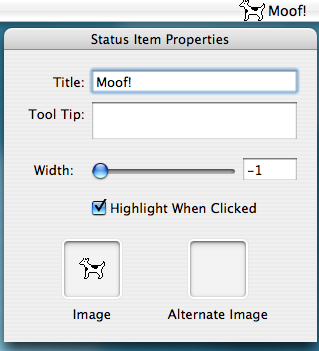
My graphic designer is working on a menu bar icon for the next version of Hazel. The problem is that it’s hard to visualize them in situ. To aid my designer in this regard, I threw together a quick little proggie. It’s just a simple program that has a menu bar icon. It provides a controls where you can edit NSStatusItem settings as well as image wells into which you can drag icons. The status item updates so you can see your icons in their natural habitat.

StatusItemTester Screen

I also added an image well where you can test out app icons to see how they look in the dock.

Source (what very little there is) and binary included. MIT license. Valentine’s Day has passed but it’s never too late to show your designer a little love.

Download: Status Item Tester

2 comments » | Cocoa, Downloads, Icons, OS X

Back to top